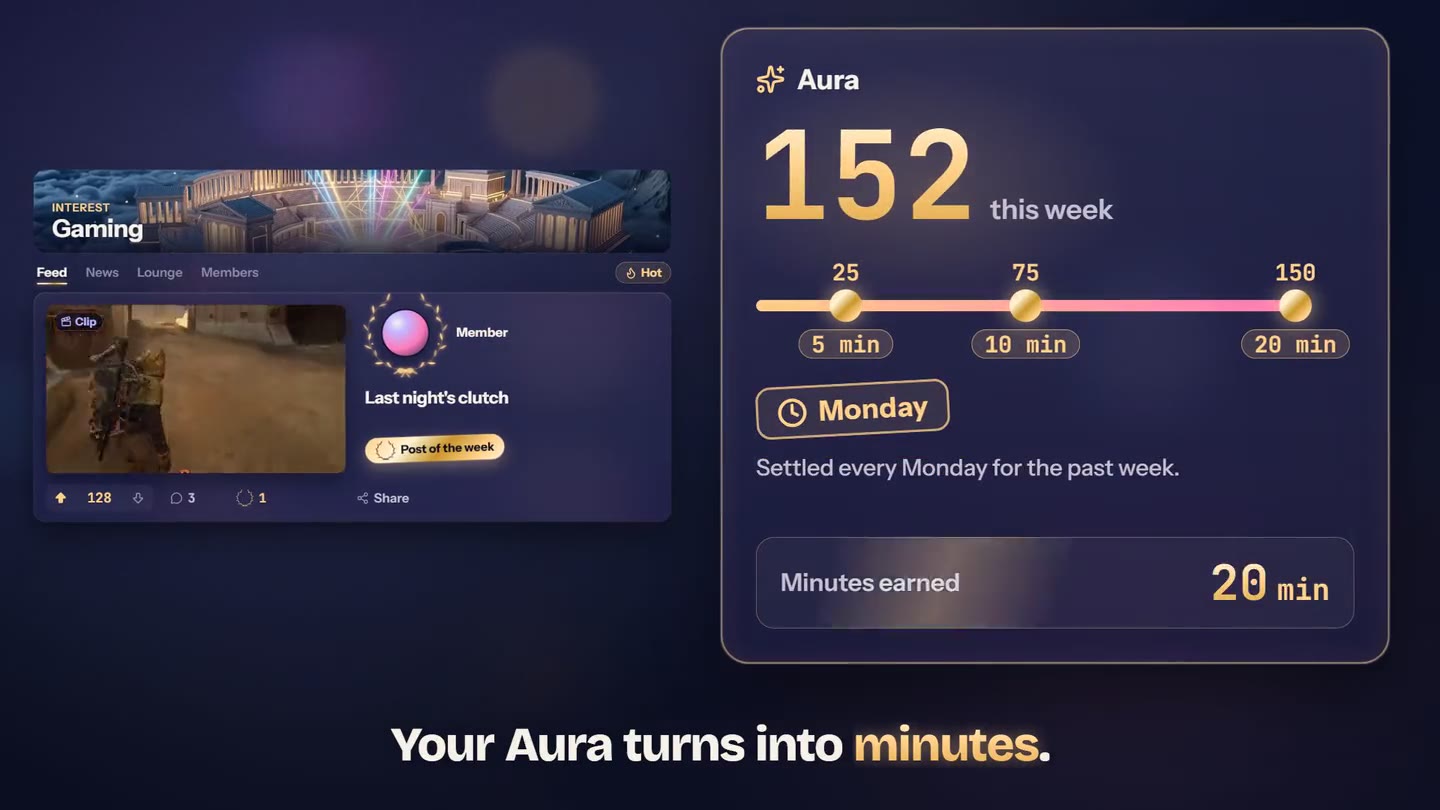
Fifteen channels: three interests and twelve languages. Each one has its feed, its news and a live lounge. Votes and Laurels raise your Aura, and every Monday, your week’s Aura turns into credit minutes.
Alone against the algorithm, you never know what works.
You stream, you clip, you post, and the only answer is a view counter. No one to tell you what hooks, no one to compare with, and campaigns that go by without you seeing them. Here, streamers and clippers vote, comment and swap their clips and tips, in your language.
Getting started
Three moves
1Create your accountFree, no credit card. Your language channel welcomes you right away.
2Pick your interestsGaming, IRL, Clipping: one to three, and you can switch anytime.
3Post, vote, chatA clip you are proud of, a question, a tip: the community answers, and your Aura gets going.
Fifteen channels
Your passion has a channel. So does your language.
Pick one to three interests and switch whenever you like. Your language channel welcomes you the moment you arrive.
Channels fill themselves: live streams of the moment, gaming press, releases, blog articles and clipping campaigns, each by topic and language.
Inside a channel
A feed, a news desk, a lounge
The feed keeps what the community votes up, the news arrives on its own, and the lounge talks live. Laurels crown what deserves it.
HotFeed
27
18
3Last night’s clutch
A feed that votes
Post a text, one of your clips, a link or an image. The community votes with two arrows, comments, and the best posts rise to the top of Hot.
Hot, New or Top: three ways to read the feed
Threaded comments that get voted too
Text and clips for everyone, links and images on a paid plan
Live now
Live
Live
Live
ReleaseA long-awaited game comes out on Friday
CampaignNew clipping campaign
News that arrives on its own
Live streams of the moment, game releases, the press and clipping campaigns sort themselves into the right channels. A channel stays alive even when nobody is typing.
“Live now”: the most watched streams
Releases, press and blog articles, by channel
Live streams play without leaving the app
Gaming11 online
Who is watching the tournament tonight?
今夜の配信、最高だった!See translation
Let’s talk about it in the feed after.
A live lounge
Every channel has its real-time chat and its count of members online. React, mention, and translate a message that is not in your language in one click.
Translate any message in one click
AI moderation before anything is posted
GIFs and links on a paid plan
+5 Aura
Laurel
Laurels
A rare distinction: three a week, yours to give once your account is over 48 hours old with a ready clip. A Laurel crowns a post or a comment and earns its author 5 Aura.
Three a week, whatever your plan
You can never give one to yourself
Your allowance comes back every Monday
A channel from the inside
Twelve moves, one screen
Scroll: each move shows up on the phone, right where you will find it in the app.
Preview
Interest
Gaming12 online
FeedNewsLoungeMembers
Hot
Member· 2 h ago
Last night’s clutch
Clip
100
The timing is perfect.
Posting it on TikTok too?
+30 min
Campaign
New clipping campaign
View the campaign
Live nowAll live streams
Live
Live
Live
From the blog
ReleaseA long-awaited game comes out on Friday
ArticleClipping a live stream: the right reflexes
CampaignNew clipping campaign
NotificationsChatWatch
Gaming12 online
Who is watching the tournament tonight?
Tonight’s stream was amazing!See original
Let’s talk about it in the feed after.
Your interests
Interests
Gaming
IRL
Clipping
Languages
English (your language)
Confirm
Post in Gaming
TextLinkClipImage
Last night’s clutch
Post
3
NotificationsChatWatch
streamclipping.ai/community/gaming
01Interests
Pick your channels
On your first visit, you tick one to three interests. Your language channel welcomes you on its own.
Gaming, IRL, Clipping: one to three, your call
Your language channel, with nothing to do
Change your picks whenever you like
02Post
Post what you want to show
A title, some text if you like, and one of your ready clips, a link or an image. Your clip plays right in the feed.
Text and clips for everyone
Links and images on a paid plan
Five posts a day on the free plan, ten on a paid plan
03Vote
The community decides what rises
Two arrows, one score. The best-voted posts rise to the top of Hot, and every upvote you receive earns you 1 Aura.
Hot, New, or Top of the day, week or month
Change or remove your vote anytime
Votes from brand-new accounts do not count
04Comment
Conversations you can follow
Reply to a post or a comment and mention a member with @. The author is notified in the app.
Threaded replies, three levels deep
Comments get voted too
Mentions with @, notified in the app
05Laurel
Crown what deserves it
A Laurel takes two taps to give, and it carries weight: 5 Aura for the author, and you only have three a week. Giving one requires an account over 48 hours old with a ready clip.
On a post or a comment
One per post per member
Your allowance comes back every Monday
06News
News, without looking for it
The News tab gathers live streams of the moment and the channel’s news: press, game releases, blog articles, campaigns.
“Live now”: the most watched streams
“From the blog”: our articles, in English and French
Every item keeps its source and link
07Lounge
The lounge, live
The lounge opens in the bubble without leaving the page. See who is online, react, and translate a message in one click.
Members online, in real time
Reactions, mentions and GIFs
A language channel opens its lounge at 20 members
08Watch
Watch live streams together
A stream catches your eye? It plays in the app’s player while you keep chatting next to it. “All live streams” opens the full list.
The player stays open while you browse
Filters by language and audience size
Clips from the feed play in the same place
09Campaigns
Campaigns come to you
When a clipping campaign starts, it lands in its interest, in Clipping and in its language channel, with its pay per 1,000 views and its pool.
Everything is on the card before you click
The best offers spotted elsewhere too
Clipping gets every campaign
10Post of the week
One winner per channel, every week
On Monday, the week’s best-voted member post is crowned in every open channel: highlighted in gold in the feed, announced in the lounge, and rewarded.
At least five upvotes from different members
+30 minutes and +25 Aura for its author
Gaming and IRL: shared on our Discord too
11The bubble
The community follows you everywhere
In the app, a floating bubble keeps your notifications, the chat and live streams within thumb’s reach, on desktop and on mobile. Put it wherever you want.
Notifications, Chat and Watch in one bubble
“Channels” in the app menu
On iPhone and Android too
12On the web
The feed can be read outside too
Channel feeds are public on streamclipping.ai: anyone can read them, and search engines find them. Taking part happens in the app.
A link to share for every channel
Under your profile name, never your email
Free to read, no account needed
Aura
Your Aura turns into minutes
Aura measures what the community thinks of your contributions. Every Monday, last week’s Aura turns into credit minutes, by tiers.
What raises your Aura
An upvote received+1
Your first post of the day+2
A Laurel received+5
Post of the week+25
A downvote received−1
A downvote takes away 1 Aura, but a post can never cost you more Aura than it earned you.
Your weekAura
0this week
255 min
7510 min
15020 min
Weekly tiers
MondaySettled every Monday for the past week.
Minutes earned0 min+20 min
Caps
Up to 20 minutes a week and 60 a month, plus 30 minutes for each post of the week. Minutes are added to your workspace’s credit, within the bonus caps.
Free plan
Aura, votes and Laurels do not depend on your plan. Your minutes are set aside, up to 300 pending, and unlock as soon as you move to a paid plan.
Fair play
At most 100 positive Aura a day, at most 10 a week from the same member, and votes from accounts under 48 hours old, or without a ready clip or an approved campaign entry, do not count.
Questions
What people ask us
Is the community free?
Yes. Anyone can join the channels, post texts and clips, vote and comment. Links are for paid plans. Images and GIFs too, but they are open during the free trial. To give a Laurel, you need an account older than 48 hours with a ready clip or an approved campaign entry. On the free plan, the minutes you earn are set aside and unlock as soon as you move to a paid plan.
How does my Aura turn into minutes?
Every Monday, from 6am UTC, last week’s Aura is converted by tiers: 5 minutes from 25 Aura, 10 minutes from 75, 20 minutes from 150. It is capped at 60 minutes a month. The post of the week earns 30 more minutes, outside that cap.
What are Laurels for?
A Laurel is a distinction you give to a post or a comment that deserves it. You have three a week, whatever your plan, and each one earns its author 5 Aura. You can never give one to yourself, and giving one requires an account older than 48 hours with a ready clip or an approved campaign entry.
Why does a language channel not have a lounge yet?
An empty lounge helps no one: a language channel’s chat opens when it reaches 20 members. Its feed and news work from day one. The French, English, Spanish and Portuguese channels are open, like the three interests.
How is the post of the week chosen?
In every open channel, it is the week’s best-voted member post, as long as it received at least five upvotes from different members. It is highlighted in gold in the feed, announced in the lounge, and earns its author 30 minutes and 25 Aura.
Who sees what I post?
Members in the app, and everyone on the channels’ public pages on streamclipping.ai. Everywhere, you appear under your profile name (at first the one from your Google or Twitch account if you signed up with one), which you can change in your settings, with the picture you added, if any. Never with your email address.
How does the community stay healthy?
Every post, comment and message goes through AI moderation before it is published. Three reports from different trusted members hide a post or a comment until it is reviewed, and votes from brand-new accounts, or accounts without a ready clip, do not count.
Is the community available on mobile?
Yes, in the app on iPhone and Android as well as in the browser: the floating bubble keeps the chat, notifications and live streams within thumb’s reach, and “Channels” is in the menu. Notifications show up in the app.
Your channel is waiting.
Create your account, pick your interests, and post: the next post of the week could be yours.