Clip editor

You click.It changes.

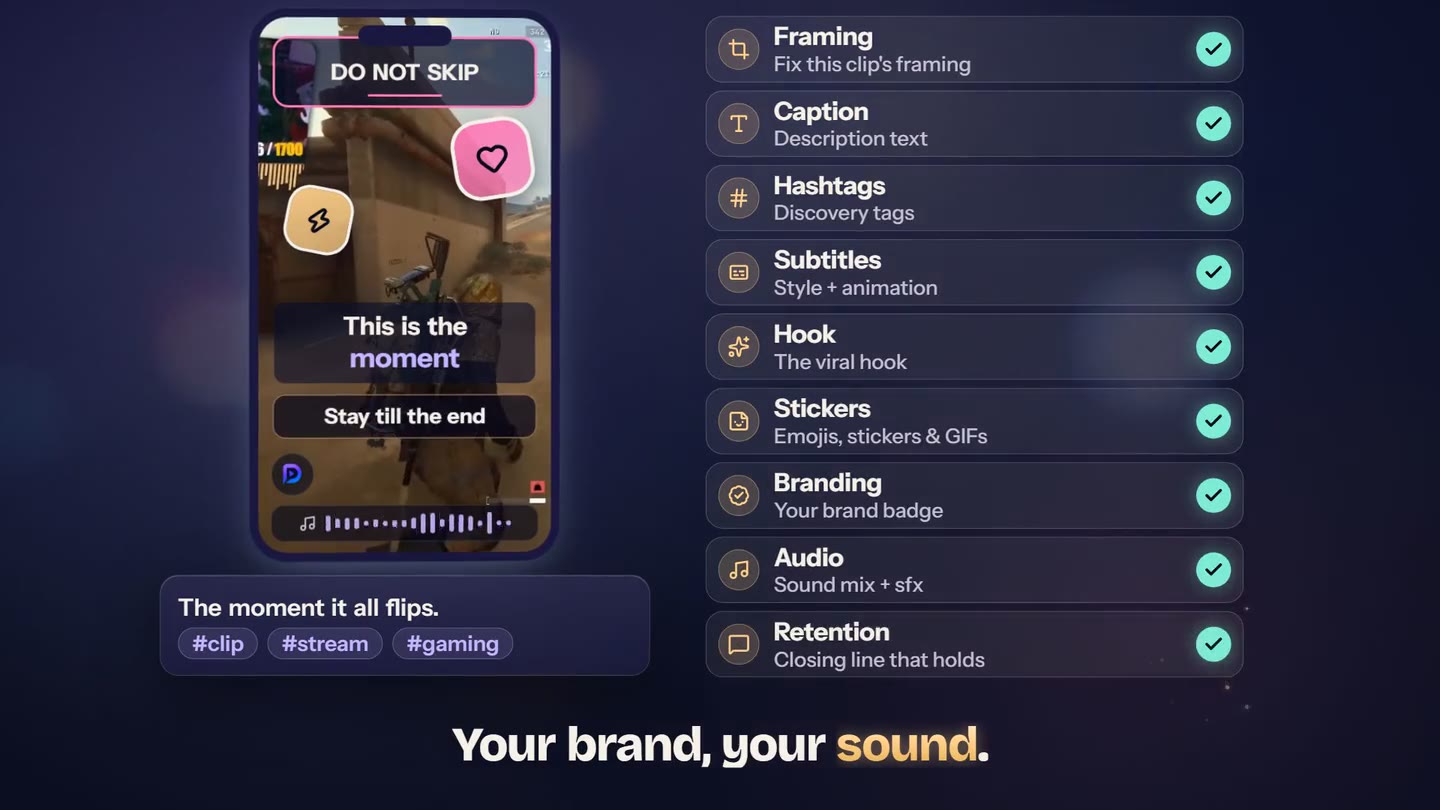
The AI sets every clip on its own. You open the editor when you want to fix one detail: the framing, the hook, the subtitles, the music, your brand. Everything shows live, and the render is back in one to two minutes.

  • 7 days free
  • No credit card
  • Render in one to two minutes

Three signatures

What you won’t find anywhere else

Three settings that make a StreamClipping clip recognizable at first glance. The other eight follow below.

Reactive subtitles

From Creator

Shouted or stressed words animate harder than the rest, following the sound and the meaning. You pick the variation and the intensity, or you let Magic decide.

  • 15 variations, from Subtle to Chaotic
  • Word-by-word karaoke, smart emojis
  • Fix a sentence at a time, timings never move

Hook materials

The top line isn’t plain text: it’s a card with a material. Glow, glass, sticker, neon, extrude, gradient. And, from Creator, a keyword that grows and switches color.

  • Six materials, 100+ complete looks in one click
  • Six hook archetypes suggested by the AI
  • A/B test with the AutoPilot (Pro and up): up to three variants published

Smart Camera

An AI camera operator that frames every clip on its own, on every plan. One person? Stays centered. Several? Whoever is talking goes big. Shot on a phone? Full screen. With Elite, the camera also moves: it follows the face.

  • Automatic framing clip by clip, nothing to set
  • The camera that follows the face, with Elite
  • Four manual layouts if you’d rather frame it yourself

The phone

Everything is set on one screen

Scroll: every setting lands on the clip, exactly where it will show. The names are the real editor’s.

  1. Framing

    A badly framed clip gets fixed alone, without touching the others

    Wrong framing on one clip? Pick the right layout and regenerate that clip only. The others don’t move.

    • Four layouts: cam + game split, picture-in-picture, game only, cam only. Plus a one-click full-screen preset without the cam
    • Frame with the AI, from Creator: it spots the cam and sets the frame
    • The format, vertical 9:16 or 16:9 for X, is chosen when framing the project
  2. Hook

    The line that decides whether people stay

    The text at the top. Its font, its material, its color, its keyword that grows. The AI suggests six hooks, you keep the one that sounds like you.

    • Six materials: glow, glass, sticker, neon, extrude, gradient
    • Subtle loop, from Creator: pulse, shake, float, breathe
    • Six AI archetypes: curiosity, shock, list, question, promise, pattern break
  3. Subtitles

    The clip’s style, word by word

    100+ complete looks, 22 animations, and reactive text that follows the sound. Fixing a sentence? Timings stay those of the transcript.

    • Paradis packs: glow, bubble, neon, karaoke
    • Animations and reactive text from Creator, smart emojis on emotional words
    • Reactive camera, from Pro: light zoom on a shout, full screen on a laugh
  4. Retention

    The line that keeps them until the end

    It appears in the last seconds, right where people drop. You write it, or the AI suggests it and tells you why.

    • Adjustable time before the end
    • Complete look templates, colors included
    • Free position: drag it in the preview
  5. AudioFrom Creator

    A track, some effects, your mix

    In-house library and Jamendo, sound effects, fade in and out, ducking under the voice. You can mute the original sound and keep yours.

    • Audio timeline: drop, move, trim
    • Ducking: the music dips when you talk
    • Royalty-free sounds, Jamendo under Creative Commons
  6. StickersFrom Creator

    Emojis, stickers, memes and GIFs, where and when you want

    You drop them on the clip and choose the moment they appear. Layered over the render, nothing breaks.

    • Position and timing with the mouse
    • Import from your Drive
    • Animated GIFs included
  7. BrandingFrom Pro

    Your brand badge on every clip

    Logo, handle, shape, colors: set it once in Settings, it applies everywhere. On a clip, drag it where you want, or switch it off.

    • Custom position per clip
    • One switch per clip
    • Turns views into followers
  8. Caption

    The text that ships with the clip

    The description for TikTok, Reels and Shorts. The AI writes three versions, you click the one you like or write your own.

    • Three AI variants, multi-platform, from Creator
    • The clip title is the default
    • One custom caption per clip
  9. Hashtags

    Five to fifteen tags that aim right

    A mix of popular and niche beats thirty generic tags. You add, you remove, they ship with the post.

    • One-click add, no # needed
    • On-screen advice: 5 to 15 targeted
    • Used as is when publishing
  10. AI analysisFrom Creator

    What the AI saw in this clip

    The virality score and how to read it: scenes, emotions, peaks. You understand why this clip is here before touching it.

    • Virality score per clip
    • Scene, emotion and peak detection
    • Read only: nothing to set
  11. AI DubbingFrom Creator

    The same clip, your voice, nine languages

    The AI clones your voice and creates a new version of the clip in the chosen language. Subtitles realigned word for word, background audio preserved.

    • Nine languages, one credit per dub
    • Optional lip sync
    • The dubbed version lands in your clips

The flow

Three moves, never more

  1. 01

    The AI sets everything

    Framing, hook, subtitles, retention: Magic picks a complete look for each clip.

  2. 02

    You fix one detail

    You open the clip and change what you want. The preview follows live, layer by layer.

  3. 03

    You save

    The render restarts in the background, one to two minutes. You schedule from your dashboard.

Editable over time

Every clip shows its edit window: 14 days on Free, 30 on Creator, 90 on Pro, forever on Elite.


FAQ

The questions we get

Open a clip. Change one thing.

Seven days free, no credit card. Your first clips are out in two minutes, the editor is already inside.