
Si t'as déjà cherché "outil clipping Twitch" sur Google, StreamLadder est tombé dans les 3 premiers résultats. C'est normal : ils existent depuis 2020, ils sont Twitch-natifs depuis le jour 1, et leur générateur de clips manuel a aidé des milliers de créateurs avant que l'IA arrive vraiment.
Mais on est en 2026. Le clipping a complètement changé. Et la question devient : est-ce que tu prends l'outil historique qui a évolué progressivement vers l'IA, ou l'outil IA-first qui est aussi Twitch-natif mais conçu autour de l'auto-publication ?
Je suis Fadi (Ragnarlebroc sur Twitch). J'ai utilisé StreamLadder pendant 14 mois avant de coder StreamClipping. Je connais bien leurs forces, leurs limites, et je vais te donner mon verdict honnête.
TL;DR pour les pressés
| Si t'es… | Prends |
|---|---|
| Streamer Twitch qui veut un workflow rapide IA + auto-publi | StreamClipping AI |
| Streamer Twitch qui aime éditer manuellement chaque clip (multi-cam, transitions) | StreamLadder (leur éditeur manuel reste très bien) |
| Tu veux gratuit à vie avec quelques clips/mois | StreamClipping FREE (15 min/mois + 7 jours Elite offerts) |
| Tu fais surtout des clips à partir de clips Twitch déjà existants (URL twitch.tv/clip/...) | StreamLadder (workflow d'origine optimisé pour ça) |
| Tu veux que l'IA fasse 100% du boulot et publie sans toi | StreamClipping AI (AutoPilot, fonctionnalité unique) |
| Tu veux du support FR humain rapide | StreamClipping AI (c'est moi qui réponds) |
StreamLadder, c'est qui
Outil néerlandais lancé en 2020. Au départ, un éditeur de clips Twitch manuel : tu colles l'URL d'un clip Twitch existant, tu choisis un template (gaming, IRL, music), tu ajoutes des sous-titres et de la musique, t'exportes en 9:16. Simple et efficace.
Depuis 2024, ils ont ajouté des features IA (génération auto de clips depuis VOD longue, suggestions de moments). Mais l'ADN reste l'éditeur manuel pour clips déjà existants.
Plans (vérifiés en août 2026) :
- Free : téléchargeur de clips, créateur d'emotes et édition de base, sans watermark sur l'édition de base d'après leur propre site ; les effets premium essayés en Free en ajoutent un
- Silver : affiché 8,28 $/mois (6,90 $ en annuel) : ClipGPT, sous-titres animés, 1080p 60fps, publication directe
- Gold : affiché 16,57 $/mois (13,25 $ en annuel) : planification, effets zoom et son, montage maker
- Plus un essai gratuit de 7 jours qui couvre tout
StreamLadder est-il gratuit ? La réponse claire
En partie, et honnêtement leur offre gratuite est plus généreuse qu'avant. Le téléchargeur de clips et le créateur d'emotes sont gratuits à vie, et l'édition de base exporte sans watermark : ça, c'est écrit noir sur blanc sur streamladder.com, vérifié en août 2026. Les fonctions que tu cherches sans doute, ClipGPT, sous-titres animés et publication directe, sont payantes : Silver et Gold, affichés 8,28 $ et 16,57 $ par mois le même mois, avec un essai de 7 jours sur tout. Je tiendrai cette section à jour si leur offre bouge.
De mon côté, le plan Free de StreamClipping te donne 15 minutes de VOD par mois à vie plus 7 jours d'Elite à l'inscription, sans carte.
Forces :
- Multi-cam editing manuel ultra solide : tu sépares face cam / game / chat, tu les arranges en split-screen, t'as un timeline VRAI avec tracks séparés. Ça reste leur force vs nous (notre éditeur multi-cam est plus automatique, moins manuellement fin).
- Templates Twitch-natifs : layouts pré-faits pour Apex / Valorant / GTA RP / IRL, etc. Bien fait, gain de temps réel.
- Bibliothèque de musiques libres très fournie (300+ tracks). On en a 200+, donc équivalent mais ils ont une légère avance.
- Édition de clips Twitch existants (URL twitch.tv/clip/xxx) en 1 clic. Workflow optimisé pour ça depuis le début.
Faiblesses (pour un workflow streamer FR moderne) :
- L'IA reste un add-on, pas le cœur du produit. Tu sens que c'est greffé au-dessus de l'éditeur manuel. Le scoring viralité est basique, les hooks suggérés sont génériques.
- Pas d'équivalent AutoPilot à cadence que j'aie trouvé (août 2026). Ils ont ajouté la publication directe TikTok/Reels/Shorts sur les plans payants, mais c'est toujours toi qui déclenches chaque post ; un pipeline mains libres de la détection à la publication programmée, je n'en ai pas trouvé chez eux.
- Pas de connexion native YouTube/Kick : workflow centré Twitch. Si tu fais aussi du YouTube Live ou Kick, faut DL la VOD à la main.
- Sous-titres animés mot-à-mot à partir de Silver (8,28 $), et la planification, les effets zoom et le montage maker sont dans Gold (16,57 $).
- UI Netherlands/EN majoritairement. Support EN, pas vraiment de support FR humain dédié.
StreamClipping AI, c'est qui
Côté pile : c'est moi (Fadi / Ragnarlebroc). J'ai fait StreamLadder pendant 14 mois, j'ai aussi essayé OpusClip pendant 8 mois (cf l'autre comparatif), et j'ai construit StreamClipping pour combiner ce que les deux faisaient bien et ce qu'ils ne faisaient pas.
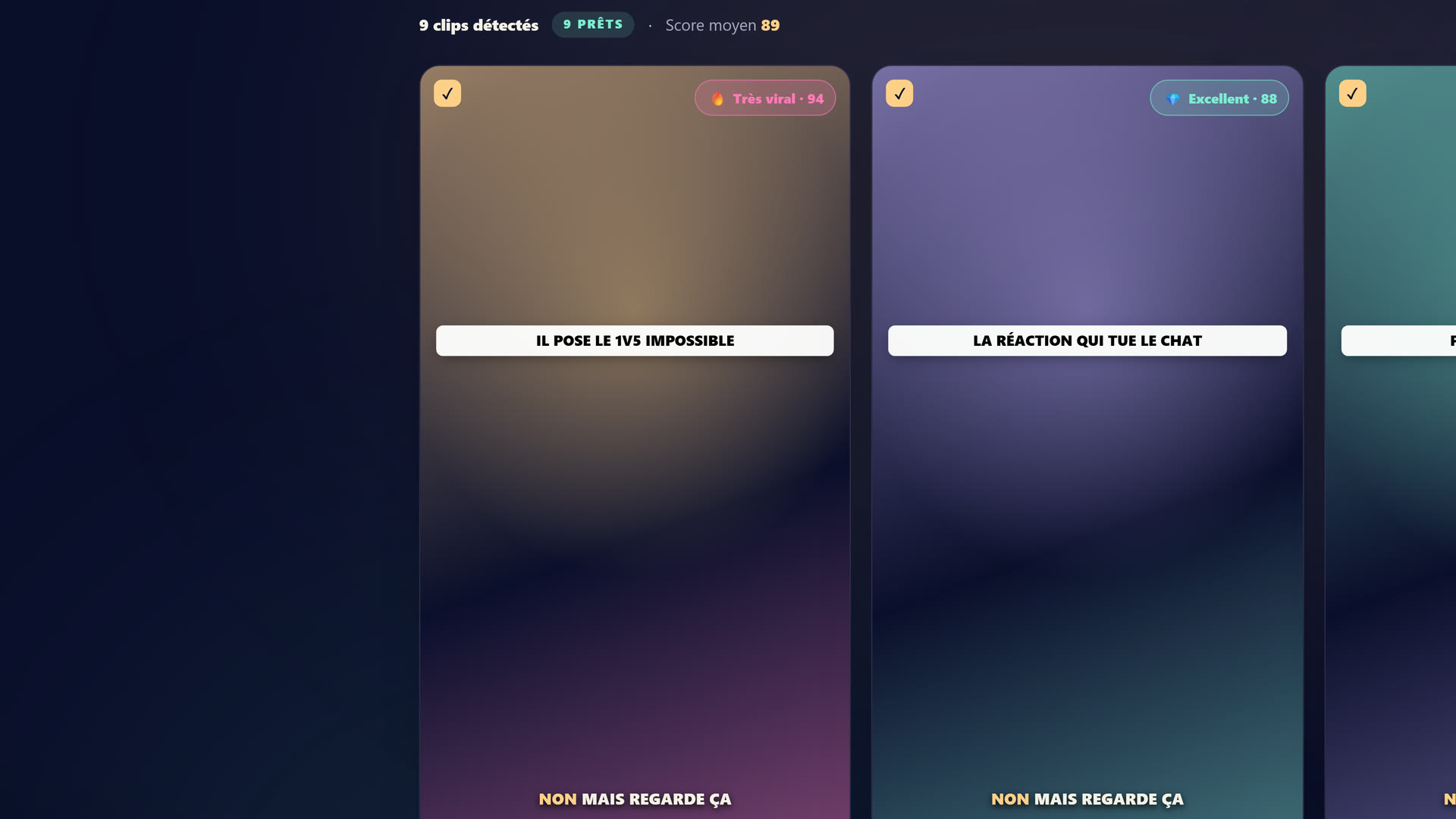 Le studio StreamClipping : tu déposes ta VOD Twitch, YouTube ou Kick, l'IA repère les moments forts et sort les clips 9:16 prêts à publier.
Tu veux ces clips dans ta vie ?
StreamClipping transforme tes lives en clips verticaux prêts à poster, sous-titres animés inclus. Plan gratuit à vie, 15 min de vidéo par mois, sans carte bancaire.
Plans :
- Free : 15 min de VOD/mois à vie + 7 jours d'Elite offerts au signup (60 min de vidéo à transformer, toutes les features IA). Sans carte.
- Creator : 19€/mois, 2160 min, sous-titres animés inclus.
- Pro : 39€/mois, 4200 min, branding custom, AutoPilot inclus.
- Elite : 139€/mois, 9600 min, Suivi réalisateur, 10 doublages IA/mois (ta voix clonée, 9 langues), musique IA, export 4K, Recap hebdo, 30 comptes par réseau, rétention 6 mois, capture en direct 8h/session.
Forces vs StreamLadder :
- IA-first : la détection des moments, le scoring viralité, les hooks, les sous-titres animés synchronisés mot-à-mot, tout est généré par l'IA en sortie. Pas un add-on, c'est le moteur.
- AutoPilot Pro+ : tu uploads ta VOD, l'IA fait les clips, et les publie tout seul sur TikTok + Shorts + Reels + X selon ta cadence. En août 2026, je n'ai pas trouvé d'équivalent à cadence chez eux : ils publient et planifient, mais le pipeline détection vers publication n'est pas mains libres.
- Connexions natives YouTube + Kick + Twitch via URL ou OAuth. Pas que Twitch.
- Sous-titres animés mot-à-mot inclus dès Creator (19€), générés et synchronisés par le même moteur qui découpe le clip.
- Carry-over minutes top-up : les minutes achetées ne périment jamais.
- Support FR humain direct. Tu mails fondateur@streamclipping.ai, c'est moi.
- Trial Elite 7 jours sans carte : tu testes notre plan le plus haut en vrai, 60 min de vidéo à cramer. Le Free de StreamLadder est un vrai gratuit aussi, mais leurs fonctions IA sont derrière l'essai et les plans payants.
Faiblesses honnêtes vs StreamLadder :
- Éditeur multi-cam manuel moins fin. Notre AI détecte et arrange automatiquement, ce qui marche dans 80% des cas. Pour les 20% où tu veux contrôler au pixel près où placer la face cam vs le gameplay, StreamLadder reste meilleur sur l'édition manuelle pure.
- Bibliothèque musicale légèrement plus petite : on a 200+ tracks libres, ils en ont 300+. Sur les playlists "Lofi" / "Hype" / "Electronic", on couvre la même surface mais avec moins de variété sur les sous-genres.
- Pas d'éditeur de clips Twitch existants (URL twitch.tv/clip/...) comme workflow d'entrée. On part toujours d'une VOD entière. Si t'as déjà créé un clip Twitch manuellement et que tu veux juste le styler, faut le DL et le re-upload, c'est moins direct.
Comparatif côte à côte (2026)
| Critère | StreamClipping AI | StreamLadder |
|---|---|---|
| Prix entrée payant | 19€/mois (Creator) | 8,28 $/mois (Silver, affiché août 2026) |
| Prix Pro équivalent | 39€/mois | 16,57 $/mois (Gold, affiché août 2026) |
| Free plan | 15 min/mois à vie + 7j Elite trial | Téléchargeur de clips, emote maker, édition de base |
| Watermark sur Free | Oui sur les exports Free | Non sur l'édition de base, oui sur les effets premium (leur site, août 2026) |
| Min de VOD traitées (Pro) | 4200 min (70h) | 200 exports max |
| IA détection moments forts | Vision + scoring custom Twitch FR | Algorithm basique sur audio peaks |
| Hooks IA générés | Oui, contextualisés par clip | Suggestions templates statiques |
| Sous-titres mot-à-mot animés | Inclus dès Creator (19€) | À partir de Silver (8,28 $) |
| Multi-cam manuel | Auto-détecté + édition possible | Édition manuelle plus fine ✓ |
| Templates pré-faits par jeu | Non (l'IA s'adapte) | Oui, library de templates ✓ |
| Bibliothèque musicale | 200+ tracks libres | 300+ tracks libres ✓ |
| Export 9:16 | Oui | Oui |
| Export 16:9 paysage (pour X) | ✓ inclus | Non natif (rare add-on) |
| AutoPilot publication auto | ✓ Pro+ (4 plateformes, à cadence) | Publication directe + planification Gold ; pas d'équivalent à cadence trouvé (août 2026) |
| Connexion Twitch | Oui (URL ou OAuth) | Oui (depuis le début, le mieux intégré) ✓ |
| Connexion YouTube | Oui | Limité (DL VOD à la main) |
| Connexion Kick | Oui | Limité |
| Édition clip Twitch existant (URL clip) | Non | ✓ workflow d'origine ✓ |
| Support humain | FR + EN direct | EN principalement |
| Carry-over minutes/exports | ✓ sur top-ups | Non |
Le test : 1 stream Twitch 4h, traité par les deux
J'ai fait ce test en mai 2026, sur les plans de l'époque, avec ma VOD du 8 mai (Valorant ranked + IRL fin de stream). Voici les chiffres :
StreamLadder (leur tier IA de l'époque) :
- Détection moments forts : 9 propositions sur 4h
- Scoring viralité : 5 clips notés "high potential" (sans détail du score)
- Édition par clip : 2-3 min de finition manuelle nécessaire pour chacun (placer face cam, choisir musique, etc.)
- Sous-titres : générés en EN par défaut, faut re-générer en FR
- Multi-cam : excellent, split screen game+cam clean en 30 sec
- Workflow total pour 5 clips publiés : ~40 minutes
StreamClipping (Pro 39€) :
- Détection moments forts : 18 propositions sur 4h
- Scoring viralité : score 0-100 affiché sur chaque clip, médiane à 81/100
- Édition par clip : 0 si tu valides tel quel (10 sec si tu veux ajuster un hook ou un sous-titre)
- Sous-titres : auto en FR (langue cam détectée), 6 styles
- Multi-cam : auto-détecté correctement sur 15/18 clips, les 3 autres faut switcher manuel (10 sec)
- AutoPilot programme la publication des 18 clips sur 6 jours
- Workflow total pour 18 clips publiés : ~5 minutes (review rapide + 1 ajustement)
Verdict du test : sur du volume + automatisation, StreamClipping écrase. Sur un seul clip ultra-soigné où tu veux le contrôle manuel parfait, StreamLadder a une UX d'édition plus fine.
Quand prendre StreamLadder plutôt que nous
Sois honnête avec toi-même :
-
Tu fais 1-3 clips par semaine maximum, tu prends le temps d'éditer chacun manuellement. Le multi-cam manuel de StreamLadder est meilleur que notre version auto.
-
Ton workflow d'origine c'est de cliquer "Clip" sur Twitch pendant ton live, puis de styler ces clips Twitch existants. StreamLadder est conçu pour ça depuis 5 ans, nous on part toujours de la VOD complète.
-
Tu fais que du Twitch, pas du YouTube ni du Kick. StreamLadder est full-Twitch.
-
Tu veux un éditeur visuel timeline-based type Premiere/CapCut light, où tu vois les tracks audio/vidéo/sous-titres et tu touches chaque détail. C'est leur approche, c'est pas la nôtre.
-
Tu cherches la library de templates pré-faits par jeu (skin Apex, layout Valorant, IRL chill, etc.). Ils en ont plus que nous.
Si tu coches 2+ de ces 5 cases → StreamLadder est probablement mieux pour toi. C'est honnête.
Quand prendre StreamClipping plutôt que StreamLadder
-
Tu fais 5+ clips par semaine et tu veux que l'IA fasse 90% du boulot. Notre AutoPilot + scoring viralité te font gagner heures/semaine.
-
Tu publies sur 3-4 plateformes (TikTok + Shorts + Reels + X). On a la publication auto, eux non.
-
Tu streams en FR et tu veux que la détection des moments forts comprenne ton contenu. Notre dataset est FR-first.
-
Tu veux upload une VOD entière de 4h+ et que tout sorte tout seul. StreamLadder peut aussi mais l'effort d'édition par clip est plus important.
-
Tu fais aussi du YouTube Live ou du Kick, pas que du Twitch. On connecte les 3 nativement.
-
Tu veux un support FR humain réactif. Mes mails sont lus par moi, pas un bot.
-
Tu veux le trial Elite 7 jours sans carte pour tester en condition réelle avant de payer.
-
Tu veux que tes clips parlent d'autres langues. Le doublage IA clone ta propre voix en 9 langues, réaligne les sous-titres sur le script doublé et préserve le fond sonore d'origine ; Elite inclut 10 doublages par mois et des packs de crédits dès 7 € sont ouverts à tous les plans payants.
FAQ
StreamLadder est-il vraiment moins cher que StreamClipping ?
En façade oui : Silver, affiché 8,28 $ par mois en août 2026, coûte moins que notre Creator à 19€, et Gold à 16,57 $ moins que notre Pro. Mais les deux produits ne mesurent pas la même chose : leurs tiers comptent des exports et des fonctions d'édition, les nôtres des minutes de VOD qui traversent tout le pipeline IA (détection, scoring, sous-titres, publication AutoPilot). Si l'IA fait le boulot de bout en bout, le vrai comparatif c'est le prix par clip publié sur ton volume réel. Fais ce calcul sur ton propre mois avant de décider.
Je peux migrer mes clips de StreamLadder vers StreamClipping ?
Les MP4 exportés tu peux les uploader chez nous (utile pour les passer dans notre community remix ou les re-styler avec nos sous-titres). Mais les projets en cours, configs, brand kits ne sont pas portables, et c'est pareil dans l'autre sens. Faut recréer ta config, 5 min.
StreamLadder a-t-il l'AutoPilot ou la publi auto ?
Ils ont la publication directe TikTok, Reels et Shorts sur les plans payants, et la planification dans Gold : ça, c'est sur leurs propres pages en août 2026. Ce que je n'ai pas trouvé chez eux, c'est un pipeline à cadence où l'IA détecte, découpe et publie toute seule selon ton rythme, sans que tu pilotes chaque post. Cette boucle mains libres, c'est toujours ce que fait notre AutoPilot.
Est-ce que StreamClipping est meilleur sur tout ?
Non, je l'ai dit : leur éditeur multi-cam manuel est plus fin, leur library de templates plus fournie, leur workflow "clip Twitch URL" plus direct. Si ces 3 points sont critiques pour toi, leur outil est meilleur sur ces axes. Mais sur le volume, l'automatisation, l'auto-publi multi-plateformes et le support FR, StreamClipping AI reste devant. C'est pour ça que je fais des comparatifs honnêtes plutôt que du marketing.
Tu touches une commission de StreamLadder ?
Non. Aucun partenariat, aucun affiliate. Ce comparatif n'est sponsorisé par personne.
Verdict
Le comparatif complet, point par point, est résumé sur notre page StreamClipping vs StreamLadder (tableau tenu à jour à chaque évolution produit).
Pour un streamer Twitch qui veut un workflow rapide + auto-publi : prends StreamClipping. AutoPilot + scoring FR + multi-plateformes natives = gain de temps de plusieurs heures par semaine vs StreamLadder.
Pour un streamer qui édite manuellement chaque clip avec soin : StreamLadder garde une avance sur l'édition fine multi-cam et leur library de templates.
Pour la majorité des streamers FR qui lisent cet article : tu fais probablement >5 clips/mois et tu veux que ça tourne tout seul. Dans ce cas, StreamClipping AI est l'outil à prendre. Tu testes 7 jours d'Elite sans carte. Si tu n'accroches pas, tu pars. Si tu aimes, tu sais le prix.
StreamClipping AI te laisse tester ça gratuitement, 15 minutes de vidéo par mois à vie, sans carte bancaire.
Tu veux ces clips dans ta vie ?
StreamClipping transforme tes lives en clips verticaux prêts à poster, sous-titres animés inclus. Plan gratuit à vie, 15 min de vidéo par mois, sans carte bancaire.
Prêt à transformer tes lives en clips qui percent sans y passer tes nuits ? Teste StreamClipping gratuitement : 15 minutes de vidéo par mois à vie, sans carte bancaire.