Tu publies des clips. Régulièrement, même. Et ça stagne. 200 vues, 150 vues, parfois un sursaut à 1000 puis ça retombe. Tu commences à te demander si le problème c'est toi, ton contenu, ou juste la malchance.
La plupart du temps, ce n'est aucun des trois. C'est une erreur technique précise, souvent invisible, qui plombe tes clips. Voici les 7 plus courantes, et le fix pour chacune.
1. Tes deux premières secondes ne disent rien
C'est de loin la raison numéro un. Sur TikTok, les gens décident en deux secondes s'ils restent. Si ton clip commence par un temps mort, un logo, une intro ou juste toi en train de parler de rien, ils sont déjà partis.
Le fix : ton clip doit démarrer pile sur le moment fort, ou juste avant. Pas d'intro, pas de montée en puissance. Le pic, tout de suite. Et une accroche claire dès la première image.
2. Ton clip n'est pas vraiment vertical
Un clip posté en horizontal, avec deux grosses bandes noires en haut et en bas, ça crie l'amateur. L'algorithme et les spectateurs préfèrent largement le format plein écran.
Le fix : un vrai format vertical, plein cadre. Ta facecam et l'action du jeu doivent rester visibles, l'une au-dessus de l'autre. Pas de bandes noires.
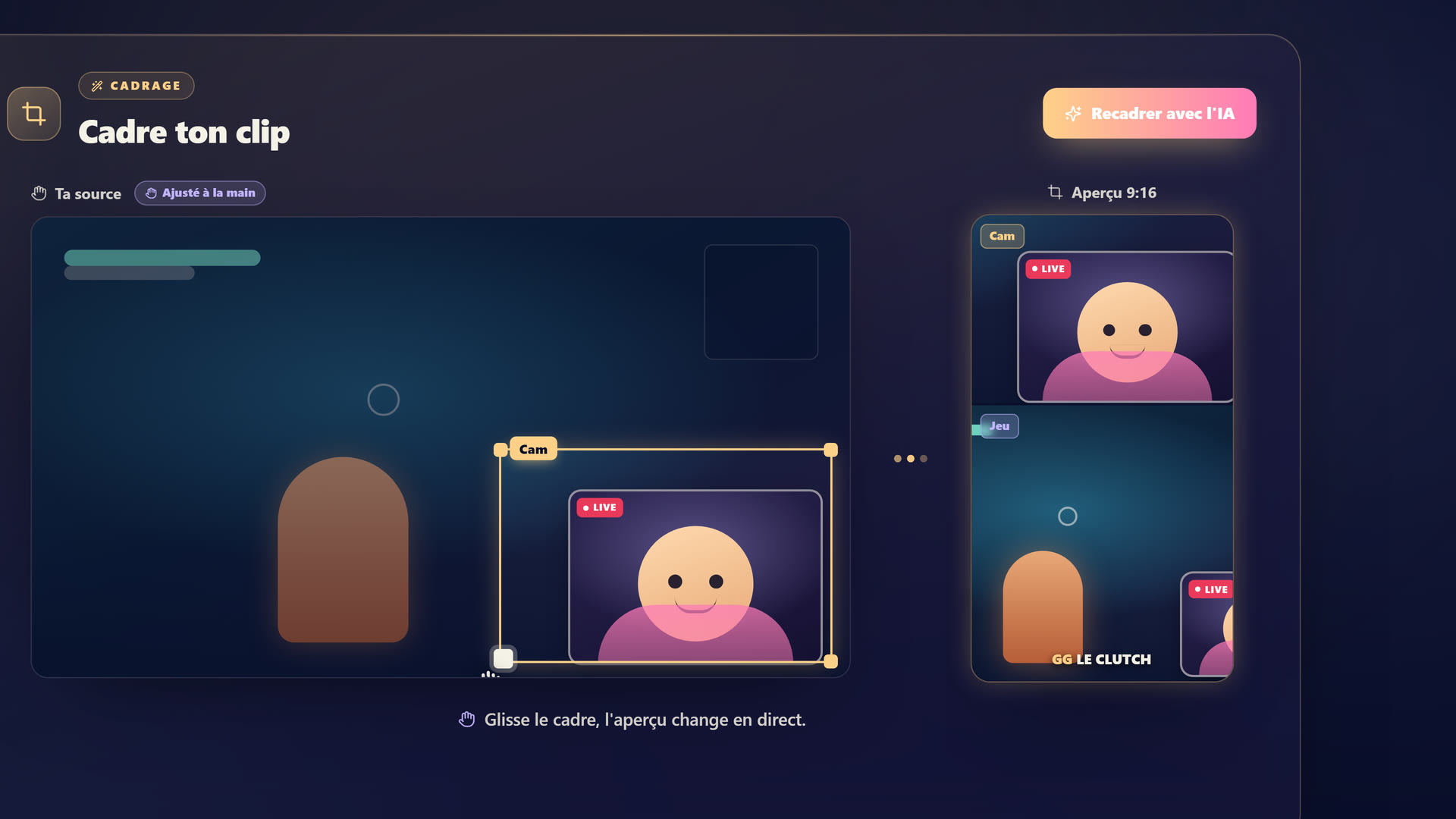 StreamClipping recadre ton clip horizontal en 9:16 plein cadre et empile ta facecam au-dessus du gameplay.
3. Il n'y a pas de sous-titres
La majorité des gens regardent TikTok sans le son. Sans sous-titres, ton clip est muet pour eux. Ils ne comprennent rien, ils scrollent.
Le fix : des sous-titres gros, affichés mot par mot, calés sur ta voix. Ce n'est plus une option en 2026, c'est la base.
4. Ton clip est trop long
Tu gardes 90 secondes parce que "tout est bien". Mais plus le clip est long, plus les gens ont d'occasions de partir, et plus l'algorithme voit un mauvais taux de visionnage.
Le fix : vise 20 à 40 secondes. Coupe tout ce qui n'est pas le moment fort. Un clip court et dense bat un clip long et mou.
Tu veux ces clips dans ta vie ?
StreamClipping transforme tes lives en clips verticaux prêts à poster, sous-titres animés inclus. Plan gratuit à vie, 15 min de vidéo par mois, sans carte bancaire.
5. Tu ne publies pas assez
Un clip par semaine, c'est une chance par semaine d'être poussé. L'algorithme récompense le volume et la régularité. Si tu postes rarement, il ne te connaît pas, il ne te teste pas.
Le fix : passe à plusieurs clips par jour. Ça paraît énorme, mais avec une VOD par live tu as largement la matière. Le problème, c'est le temps de montage, pas le contenu.
6. Ton compte n'est pas chauffé
Un compte tout neuf qui balance des clips dès le premier jour, TikTok le regarde de travers. Il ne sait pas encore si tu es un vrai créateur ou un robot.
Le fix : chauffe ton compte avant de publier en volume. Quelques jours à te comporter en utilisateur normal, puis une montée en puissance progressive. On a écrit la méthode complète, le lien est en bas.
7. Ton clip demande trop de contexte
Un moment qui te fait hurler de rire peut tomber à plat pour quelqu'un qui ne connaît ni le jeu, ni le lore, ni la blague interne avec ton chat. Si ton clip a besoin de dix minutes de contexte, il ne marchera jamais en cold.
Le fix : choisis des moments qui se comprennent seuls. Une réaction, une punchline, une action lisible. Et si un peu de contexte est nécessaire, donne-le en une phrase dans l'accroche.
En résumé
Si tes clips stagnent, ce n'est presque jamais une fatalité. C'est une de ces 7 erreurs : un début mou, un mauvais format, pas de sous-titres, un clip trop long, pas assez de volume, un compte froid, ou un moment trop dépendant du contexte.
La bonne nouvelle, c'est que la plupart se règlent d'un coup avec un bon outil. Un clipper IA sérieux te sort des clips déjà verticaux, sous-titrés, à la bonne durée, avec une accroche, et en volume. Il te reste juste à bien choisir tes moments et à chauffer tes comptes.
StreamClipping AI te laisse tester ça gratuitement, 15 minutes de vidéo par mois à vie, sans carte bancaire.
À lire aussi pour aller plus loin :
- Warmer un compte TikTok de clips sans se faire shadowban
- 12 hooks TikTok qui claquent en 2026
- Comment clipper un stream Twitch : la méthode de A à Z
Fait avec amour, par un streamer pour les amoureux du stream. Ragnarlebroc.