You go live, the chat laughs, stuff happens. And it all ends up in a VOD nobody ever reopens. You know you should be clipping. Everyone tells you. But you don't really know where to start.
This article gives you the full method. From spotting something clippable to hitting publish on TikTok. No fluff, just the steps in order.
What does clipping actually mean
Clipping means taking a specific moment from your live and turning it into a short, vertical video that you post on TikTok, YouTube Shorts or Instagram Reels.
The idea is simple. Your live runs for hours and only reaches the people already there. A clip lasts 30 seconds, it's built for the phone format, and it can be seen by thousands of people who don't know you yet. The clip is your trailer. The live is the movie.
Step 1: spot the right moment
A good clip moment isn't always the most spectacular one. It's the fastest to understand. Someone scrolling gives you two seconds. If they don't know why to stay in two seconds, they're gone.
The moments that almost always land:
- a big reaction, you scream, you laugh, you're shocked
- a funny or savage line that stands on its own
- a play that's readable even without context
- a chat interaction that ends in a punchline
The reflex to build during the live: when something happens, just tell yourself "I'm clipping that". No need to write down the exact time, you'll find the moment again later. The goal is just to remember it.
Step 2: grab the moment
Two ways to do it.
First, the Twitch Clip button. During or after the live, Twitch lets you create a 60 second max clip from your VOD. It's fast but limited. Format stays horizontal and you can't tweak anything.
Second, start from the full VOD. You grab your VOD, or hand its link to a tool, and cut the part you want. That's what you need to do for a real clean clip.
Step 3: go vertical
TikTok, Shorts and Reels are built for the phone. Your stream is horizontal. So you have to reframe.
The trick: keep your facecam visible and the important part of the game visible, stacked on top of each other. Your face up top, the action below, for example. What matters is that we see your reaction and what triggered it.
This is the most painful step by hand. If you move around in the frame, you have to reframe over and over. A tool that tracks your cam automatically saves you a ton of time here.
Step 4: subtitles
Almost everyone watches TikTok with the sound off, at least at first. Without subtitles, your clip is silent for half the viewers. With them, they get it instantly and they stay.
The subtitles that work in 2026 are big, shown word by word, and they pop in sync with your voice. Not a wall of text at the bottom of the screen. One or two words at a time, super readable.
Step 5: the hook
The hook is the little line you place at the top of the clip. Its only job is to make people not scroll past.
A good hook is specific. "Look at this" says nothing. "The worst timing of my life" or "he never saw it coming" makes people want to stay. Describe the promise of the clip, not the clip itself.
Step 6: publish
You export your clip in vertical, good quality, and hit publish. On all three platforms if you can, because each one has its own audience.
One tip that changes everything: don't publish one clip a week. Publish often. Algorithms reward consistency. A few clips a day beat one perfect clip a week.
By hand or with AI
Let's recap how long it takes by hand for a single clip. Spot the moment, cut, reframe while tracking your cam, write and time the subtitles, add the hook, export, publish on three platforms. Count 30 to 60 minutes per clip when you're starting out.
Multiply that by the number of clips you'd need to stay consistent. You quickly get why 9 out of 10 streamers quit after two weeks.
That's exactly the problem an AI clipping tool solves. You hand it your VOD link, it spots the best moments, reframes, drops the subtitles and the hook, and serves you the finished clips. You just approve them in a few minutes. That's what we built with StreamClipping AI.
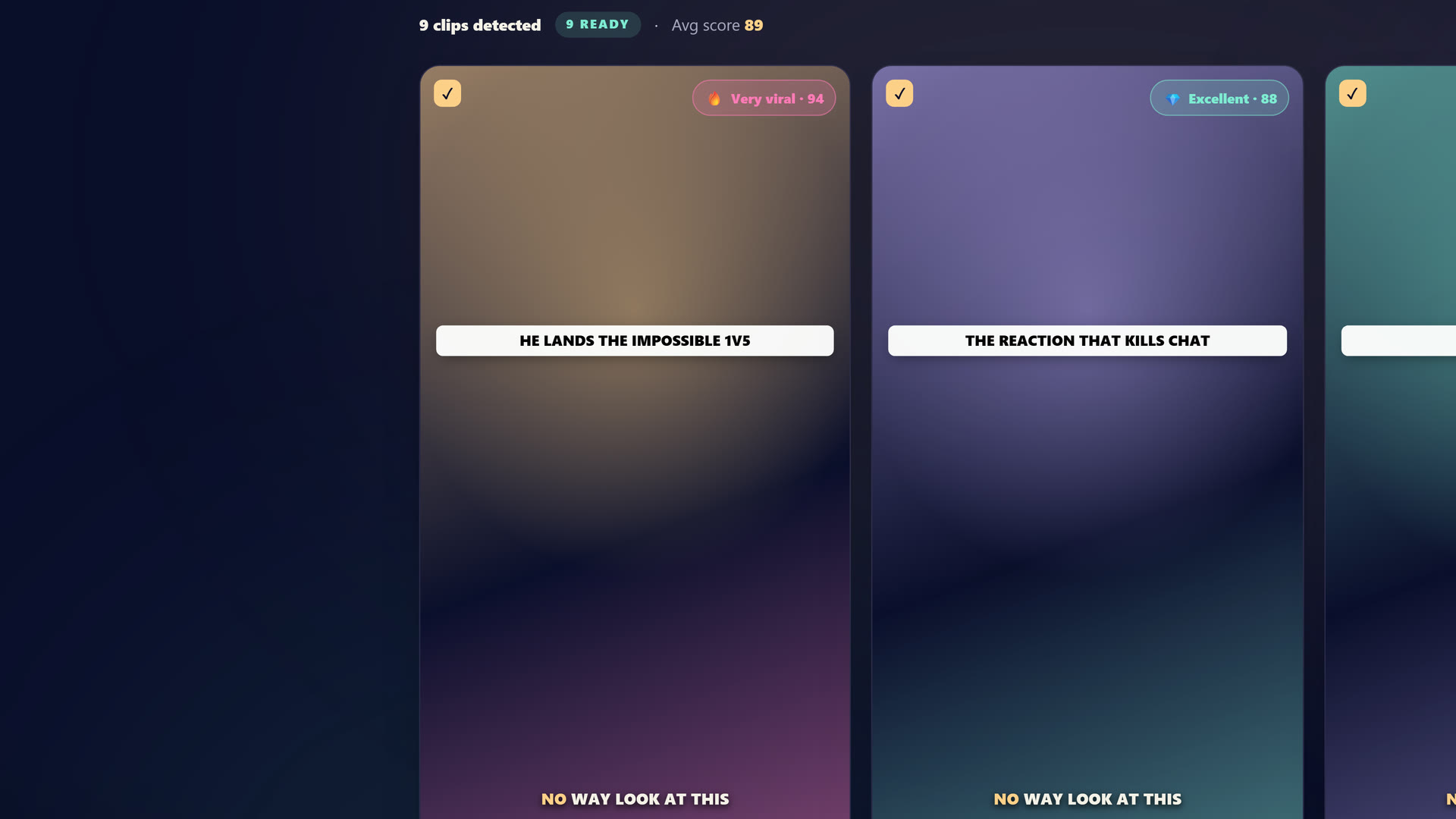 Inside StreamClipping: drop your Twitch VOD, the AI spots the moments and cuts them into 9:16 clips with subtitles and a hook.
Want these clips in your life?
StreamClipping turns your streams into vertical clips ready to post, animated captions included. Free plan for life, 15 minutes of video a month, no card.
Beginner mistakes to avoid
Picking moments that are too long
A 30 to 45 second clip works better than a 2 minute clip. Trim the fat, get straight to the peak.
Skipping the reframe
A clip posted horizontally on TikTok, with two black bars, looks amateur and doesn't break through. Always vertical.
Waiting for the perfect clip
Your clip at 200 views isn't a flop. It's practice, for the algorithm and for you. Volume beats perfection.
Betting everything on one platform
TikTok can throttle you overnight. Post on Shorts and Reels too. Don't put all your eggs in one basket.
Wrap up
Clipping a stream comes down to six steps. Spot, grab, go vertical, subtitle, hook, publish. By hand, it's doable but draining. With AI, it's just a few minutes of approvals a day.
The most important thing isn't the tool. It's getting started and staying consistent. Your best moments deserve better than sleeping in a VOD.
StreamClipping AI lets you try it free, 15 minutes of video per month for life, no credit card. Enough to test the method on your own lives without risking anything.
Read next to dig deeper:
- How to turn 1 Twitch stream into 30 viral clips
- 12 TikTok hooks that hit hard in 2026
- 10 TikTok accounts to set up to avoid the shadowban
Made with love, by a streamer for stream lovers. Ragnarlebroc.