
Si alguna vez buscaste "herramienta clipping Twitch" en Google, StreamLadder salió entre los 3 primeros resultados. Es normal: existen desde 2020, son nativos de Twitch desde el día 1, y su generador manual de clips ayudó a miles de creadores antes de que la IA llegara de verdad.
Pero estamos en 2026. El clipping cambió por completo. Y la pregunta es: ¿te quedas con la herramienta histórica que fue evolucionando poco a poco hacia la IA, o con la herramienta IA-first que también es nativa de Twitch pero está pensada alrededor de la autopublicación?
Soy Fadi (Ragnarlebroc en Twitch). Usé StreamLadder durante 14 meses antes de programar StreamClipping AI. Conozco bien sus fortalezas y sus límites, y te voy a dar mi veredicto honesto.
TL;DR para los que tienen prisa
| Si eres… | Elige |
|---|---|
| Streamer de Twitch que quiere un workflow rápido con IA + autopublicación | StreamClipping AI |
| Streamer de Twitch al que le gusta editar cada clip a mano (multicámara, transiciones) | StreamLadder (su editor manual sigue siendo muy bueno) |
| Quieres algo gratis de por vida con pocos clips al mes | StreamClipping AI FREE (15 min/mes + 7 días de Elite gratis, 1 h de video al día) |
| Haces sobre todo clips a partir de clips de Twitch que ya existen (URL twitch.tv/clip/...) | StreamLadder (su workflow original está optimizado para eso) |
| Quieres que la IA haga el 100% del trabajo y publique sin ti | StreamClipping AI (AutoPilot, función única) |
| Quieres soporte humano rápido en francés | StreamClipping AI (respondo yo) |
¿Quién es StreamLadder?
Herramienta neerlandesa lanzada en 2020. Al principio era un editor manual de clips de Twitch: pegas la URL de un clip de Twitch existente, eliges una plantilla (gaming, IRL, música), agregas subtítulos y música, y exportas en 9:16. Simple y efectivo.
Desde 2024 agregaron funciones de IA (generación automática de clips desde VODs largas, sugerencias de momentos). Pero su ADN sigue siendo el editor manual para clips ya existentes.
Planes (verificados en agosto de 2026):
- Free: descargador de clips, creador de emotes y edición básica, sin marca de agua en la edición básica según su propio sitio; los efectos premium que pruebes en Free sí la agregan
- Silver: anunciado a 8,28 $/mes (6,90 $ en anual): ClipGPT, subtítulos animados, 1080p 60fps, publicación directa
- Gold: anunciado a 16,57 $/mes (13,25 $ en anual): programación, efectos de zoom y sonido, montage maker
- Además, una prueba gratis de 7 días que cubre todo
¿StreamLadder es gratis? La respuesta clara
En parte, y siendo honesto, su oferta gratuita es más generosa que antes. El descargador de clips y el creador de emotes son gratis de por vida, y la edición básica exporta sin marca de agua: eso está escrito clarito en streamladder.com, verificado en agosto de 2026. Las funciones que seguramente buscas, ClipGPT, subtítulos animados y publicación directa, son de pago: Silver y Gold, anunciados a 8,28 $ y 16,57 $ al mes ese mismo mes, con una prueba de 7 días en todo. Mantendré esta sección actualizada si cambia su oferta.
Por mi lado, el plan Free de StreamClipping AI te da 15 minutos de VOD al mes de por vida, más 7 días de Elite al registrarte con 1 h de video al día, sin tarjeta.
Fortalezas:
- Edición multicámara manual muy sólida: separas face cam / juego / chat, los acomodas en pantalla dividida y tienes un timeline DE VERDAD con pistas separadas. Sigue siendo su fuerte frente a nosotros (nuestro editor multicámara es más automático, menos fino a mano).
- Plantillas nativas de Twitch: layouts listos para Apex / Valorant / GTA RP / IRL, etc. Bien hechos, ahorran tiempo de verdad.
- Biblioteca de música libre muy completa (300+ tracks). Nosotros tenemos 200+, así que es parecido, pero ellos van un poco adelante.
- Edición de clips de Twitch existentes (URL twitch.tv/clip/xxx) en 1 clic. Workflow optimizado para eso desde el principio.
Debilidades (para un workflow de streamer francés moderno):
- La IA sigue siendo un complemento, no el corazón del producto. Se nota que está pegada encima del editor manual. El scoring de viralidad es básico y los hooks sugeridos son genéricos.
- No encontré un equivalente a AutoPilot con cadencia (agosto 2026). Agregaron publicación directa a TikTok/Reels/Shorts en los planes de pago, pero sigues siendo tú quien dispara cada post; un pipeline manos libres desde la detección hasta la publicación programada, no lo encontré en su herramienta.
- Sin conexión nativa con YouTube/Kick: workflow centrado en Twitch. Si también haces YouTube Live o Kick, tienes que descargar la VOD a mano.
- Subtítulos animados palabra por palabra a partir de Silver (8,28 $), y la programación, los efectos de zoom y el montage maker están en Gold (16,57 $).
- Interfaz mayormente en neerlandés/inglés. Soporte en inglés, sin soporte humano dedicado en francés.
¿Quién es StreamClipping AI?
Del otro lado: soy yo (Fadi / Ragnarlebroc). Usé StreamLadder durante 14 meses, también probé OpusClip durante 8 meses (mira la otra comparativa), y construí StreamClipping AI para combinar lo que ambos hacían bien y lo que no hacían.
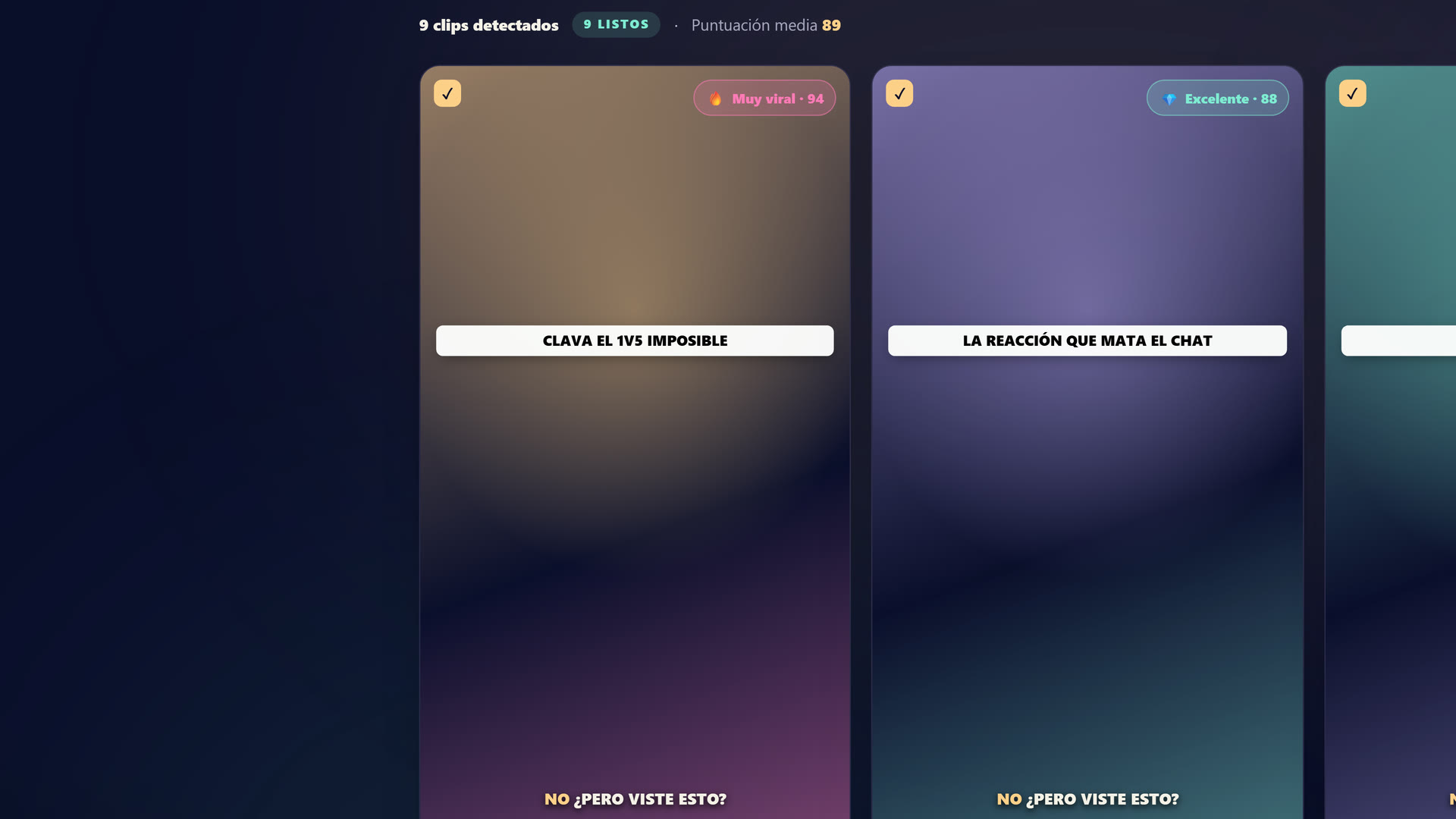 El estudio de StreamClipping AI: subes tu VOD de Twitch, YouTube o Kick, la IA encuentra los mejores momentos y saca clips 9:16 listos para publicar.
¿Quieres estos clips en tu vida?
StreamClipping convierte tus directos en clips verticales listos para publicar, con subtítulos animados. Plan gratis de por vida, 15 minutos de vídeo al mes, sin tarjeta.
Planes:
- Free: 15 min de VOD/mes de por vida + 7 días de Elite gratis al registrarte (1 h de video al día, se recarga a medianoche, todas las funciones de IA). Sin tarjeta.
- Creator: 19€/mes, 2160 min, subtítulos animados incluidos.
- Pro: 39€/mes, 4200 min, branding personalizado, AutoPilot incluido.
- Elite: 139€/mes, video ilimitado (uso razonable), Seguimiento de director, 10 doblajes con IA/mes (tu voz clonada, 9 idiomas), música libre de derechos según el ambiente, exportación 4K, Recap semanal, 30 cuentas por red, retención de 6 meses, captura en vivo de 8 h por sesión.
Fortalezas frente a StreamLadder:
- IA-first: la detección de momentos, el scoring de viralidad, los hooks, los subtítulos animados sincronizados palabra por palabra, todo lo genera la IA en la salida. No es un complemento, es el motor.
- AutoPilot Pro+: subes tu VOD, la IA hace los clips y los publica sola en TikTok + Shorts + Reels + X según tu cadencia. En agosto de 2026 no encontré un equivalente con cadencia en StreamLadder: publican y programan, pero el pipeline de detección a publicación no es manos libres.
- Conexiones nativas con YouTube + Kick + Twitch vía URL u OAuth. No solo Twitch.
- Subtítulos animados palabra por palabra incluidos desde Creator (19€), generados y sincronizados por el mismo motor que corta el clip.
- Los minutos de recarga se acumulan: los minutos que compras nunca vencen.
- Soporte humano directo en francés. Escribes a fondateur@streamclipping.ai y te respondo yo.
- Prueba de Elite de 7 días sin tarjeta: pruebas nuestro plan más alto de verdad, con 1 h de video para quemar cada día, recargada a medianoche. El Free de StreamLadder también es gratis de verdad, pero sus funciones de IA están detrás de la prueba y los planes de pago.
Debilidades honestas frente a StreamLadder:
- Editor multicámara manual menos fino. Nuestra IA detecta y acomoda automáticamente, lo que funciona en el 80% de los casos. Para el 20% en que quieres controlar al pixel dónde va la face cam frente al gameplay, StreamLadder sigue siendo mejor en edición manual pura.
- Biblioteca musical un poco más chica: tenemos 200+ tracks libres, ellos 300+. En las playlists "Lofi" / "Hype" / "Electronic" cubrimos lo mismo, pero con menos variedad de subgéneros.
- Sin editor de clips de Twitch existentes (URL twitch.tv/clip/...) como workflow de entrada. Siempre partimos de una VOD completa. Si ya creaste un clip de Twitch a mano y solo quieres darle estilo, tienes que descargarlo y volver a subirlo, es menos directo.
Comparativa lado a lado (2026)
| Criterio | StreamClipping AI | StreamLadder |
|---|---|---|
| Precio de entrada de pago | 19€/mes (Creator) | 8,28 $/mes (Silver, anunciado en agosto 2026) |
| Precio Pro equivalente | 39€/mes | 16,57 $/mes (Gold, anunciado en agosto 2026) |
| Plan gratis | 15 min/mes de por vida + 7 días de prueba Elite con 1 h de video al día | Descargador de clips, creador de emotes, edición básica |
| Marca de agua en Free | Sí en las exportaciones Free | No en la edición básica, sí en los efectos premium (su sitio, agosto 2026) |
| Min de VOD procesados (Pro) | 4200 min (70 h) | 200 exportaciones máx. |
| Detección de mejores momentos con IA | Visión + scoring propio Twitch FR | Algoritmo básico sobre picos de audio |
| Hooks generados por IA | Sí, contextualizados por clip | Sugerencias de plantillas estáticas |
| Subtítulos animados palabra por palabra | Incluidos desde Creator (19€) | Desde Silver (8,28 $) |
| Multicámara manual | Autodetectado + edición posible | Edición manual más fina ✓ |
| Plantillas listas por juego | No (la IA se adapta) | Sí, biblioteca de plantillas ✓ |
| Biblioteca musical | 200+ tracks libres | 300+ tracks libres ✓ |
| Exportación 9:16 | Sí | Sí |
| Exportación 16:9 horizontal (para X) | ✓ incluida | No nativa (complemento poco común) |
| Publicación automática AutoPilot | ✓ Pro+ (4 plataformas, con cadencia) | Publicación directa + programación en Gold; no se encontró equivalente con cadencia (agosto 2026) |
| Conexión con Twitch | Sí (URL u OAuth) | Sí (desde el principio, la mejor integrada) ✓ |
| Conexión con YouTube | Sí | Limitada (descargar VOD a mano) |
| Conexión con Kick | Sí | Limitada |
| Edición de clip de Twitch existente (URL de clip) | No | ✓ workflow original ✓ |
| Soporte humano | FR + EN directo | Principalmente EN |
| Acumulación de minutos/exportaciones | ✓ en recargas | No |
La prueba: 1 stream de Twitch de 4 h, procesado por ambos
Hice esta prueba en mayo de 2026, con los planes de ese momento, usando mi VOD del 8 de mayo (Valorant ranked + IRL al final del stream). Estos son los números:
StreamLadder (su tier de IA de ese momento):
- Detección de mejores momentos: 9 propuestas en 4 h
- Scoring de viralidad: 5 clips marcados como "high potential" (sin detalle del puntaje)
- Edición por clip: 2-3 min de retoque manual necesarios en cada uno (acomodar face cam, elegir música, etc.)
- Subtítulos: generados en inglés por defecto, hay que regenerarlos en francés
- Multicámara: excelente, pantalla dividida juego+cámara limpia en 30 s
- Workflow total para 5 clips publicados: ~40 minutos
StreamClipping AI (Pro 39€):
- Detección de mejores momentos: 18 propuestas en 4 h
- Scoring de viralidad: puntaje 0-100 visible en cada clip, mediana de 81/100
- Edición por clip: 0 si lo validas tal cual (10 s si quieres ajustar un hook o un subtítulo)
- Subtítulos: automáticos en francés (idioma de la cámara detectado), 6 estilos
- Multicámara: bien autodetectado en 15/18 clips, en los otros 3 hay que cambiarlo a mano (10 s)
- AutoPilot programa la publicación de los 18 clips en 6 días
- Workflow total para 18 clips publicados: ~5 minutos (revisión rápida + 1 ajuste)
Veredicto de la prueba: en volumen + automatización, StreamClipping AI arrasa. En un solo clip ultracuidado donde quieres control manual perfecto, StreamLadder tiene una experiencia de edición más fina.
Cuándo elegir StreamLadder en vez de nosotros
Sé honesto contigo:
-
Haces 1-3 clips por semana como máximo y te tomas el tiempo de editar cada uno a mano. El multicámara manual de StreamLadder es mejor que nuestra versión automática.
-
Tu workflow de siempre es darle a "Clip" en Twitch durante tu stream y luego darles estilo a esos clips de Twitch. StreamLadder está diseñado para eso desde hace 5 años; nosotros siempre partimos de la VOD completa.
-
Solo haces Twitch, ni YouTube ni Kick. StreamLadder es full Twitch.
-
Quieres un editor visual basado en timeline tipo Premiere/CapCut light, donde ves las pistas de audio/video/subtítulos y tocas cada detalle. Ese es su enfoque, no el nuestro.
-
Buscas una biblioteca de plantillas listas por juego (skin de Apex, layout de Valorant, IRL chill, etc.). Tienen más que nosotros.
Si marcas 2 o más de estas 5 casillas → StreamLadder probablemente es mejor para ti. Así de honesto.
Cuándo elegir StreamClipping AI en vez de StreamLadder
-
Haces 5+ clips por semana y quieres que la IA haga el 90% del trabajo. Nuestro AutoPilot + scoring de viralidad te ahorran horas cada semana.
-
Publicas en 3-4 plataformas (TikTok + Shorts + Reels + X). Nosotros tenemos publicación automática, ellos no.
-
Haces stream en francés y quieres que la detección de mejores momentos entienda tu contenido. Nuestro dataset es FR-first.
-
Quieres subir una VOD entera de 4 h o más y que todo salga solo. StreamLadder también puede, pero el esfuerzo de edición por clip es mayor.
-
También haces YouTube Live o Kick, no solo Twitch. Conectamos los 3 de forma nativa.
-
Quieres soporte humano en francés que responda rápido. Mis correos los leo yo, no un bot.
-
Quieres la prueba de Elite de 7 días sin tarjeta para probar en condiciones reales antes de pagar.
-
Quieres que tus clips hablen otros idiomas. El doblaje con IA clona tu propia voz en 9 idiomas, realinea los subtítulos con el guion doblado y conserva el sonido de fondo original; Elite incluye 10 doblajes al mes y hay paquetes de créditos desde 7 € disponibles para todos los planes de pago.
FAQ
¿StreamLadder es de verdad más barato que StreamClipping AI?
A primera vista sí: Silver, anunciado a 8,28 $ al mes en agosto de 2026, cuesta menos que nuestro Creator a 19€, y Gold a 16,57 $ menos que nuestro Pro. Pero los dos productos no miden lo mismo: sus planes cuentan exportaciones y funciones de edición, los nuestros minutos de VOD que pasan por todo el pipeline de IA (detección, scoring, subtítulos, publicación con AutoPilot). Si la IA hace el trabajo de principio a fin, la comparación real es el precio por clip publicado con tu volumen real. Haz esa cuenta con tu propio mes antes de decidir.
¿Puedo migrar mis clips de StreamLadder a StreamClipping AI?
Los MP4 exportados los puedes subir con nosotros (útil para pasarlos por nuestro community remix o darles otro estilo con nuestros subtítulos). Pero los proyectos en curso, configuraciones y brand kits no se pueden transferir, y lo mismo pasa en sentido contrario. Hay que volver a crear tu configuración, 5 min.
¿StreamLadder tiene AutoPilot o publicación automática?
Tienen publicación directa a TikTok, Reels y Shorts en los planes de pago, y programación en Gold: eso está en sus propias páginas en agosto de 2026. Lo que no encontré en su herramienta es un pipeline con cadencia donde la IA detecta, corta y publica sola según tu ritmo, sin que tú manejes cada post. Ese ciclo manos libres sigue siendo lo que hace nuestro AutoPilot.
¿StreamClipping AI es mejor en todo?
No, ya lo dije: su editor multicámara manual es más fino, su biblioteca de plantillas más completa y su workflow de "URL de clip de Twitch" más directo. Si esos 3 puntos son clave para ti, su herramienta es mejor en esos aspectos. Pero en volumen, automatización, autopublicación multiplataforma y soporte en francés, StreamClipping AI sigue adelante. Por eso hago comparativas honestas en vez de marketing.
¿Te pagan comisión de StreamLadder?
No. Ninguna alianza, ningún afiliado. Esta comparativa no está patrocinada por nadie.
Veredicto
La comparativa completa, punto por punto, está resumida en nuestra página StreamClipping AI vs StreamLadder (tabla actualizada con cada cambio de producto).
Para un streamer de Twitch que quiere un workflow rápido + autopublicación: elige StreamClipping AI. AutoPilot + scoring FR + multiplataforma nativa = varias horas ahorradas por semana frente a StreamLadder.
Para un streamer que edita cada clip a mano con cuidado: StreamLadder mantiene la ventaja en la edición fina multicámara y en su biblioteca de plantillas.
Para la mayoría de los streamers franceses que leen este artículo: probablemente haces más de 5 clips al mes y quieres que todo funcione solo. En ese caso, StreamClipping AI es la herramienta que te conviene. Pruebas 7 días de Elite sin tarjeta, con 1 h de video al día. Si no te convence, te vas. Si te gusta, ya sabes el precio.
StreamClipping AI te deja probarlo gratis, 15 minutos de video al mes de por vida, sin tarjeta.
¿Quieres estos clips en tu vida?
StreamClipping convierte tus directos en clips verticales listos para publicar, con subtítulos animados. Plan gratis de por vida, 15 minutos de vídeo al mes, sin tarjeta.
¿Listo para convertir tus streams en clips que pegan sin pasarte las noches editando? Prueba StreamClipping AI gratis: 15 minutos de video al mes de por vida, sin tarjeta.