You stream 5 times a week. Reply to DMs constantly. Spend 4 hours editing your YouTube on Sunday. Drop 2 clips per day on TikTok. Exercise "when you can". See family "on weekends".
Total week : 65-80 hours of perceived work, 50-60 hours real. You blow past the burnout threshold I described in this article.
The calendar that follows produces more content in fewer hours. It's what FR streamers who last 5+ years at 1500+ viewers use. 25 hours real work per week. 30 clips produced, 4 streams, 1 long-form YouTube, 7 days multi-platform presence. The clips aren't hand-cut either: StreamClipping AI's AutoPilot detects the best moments and generates them while you sleep, so clip output stops depending on when you're free.
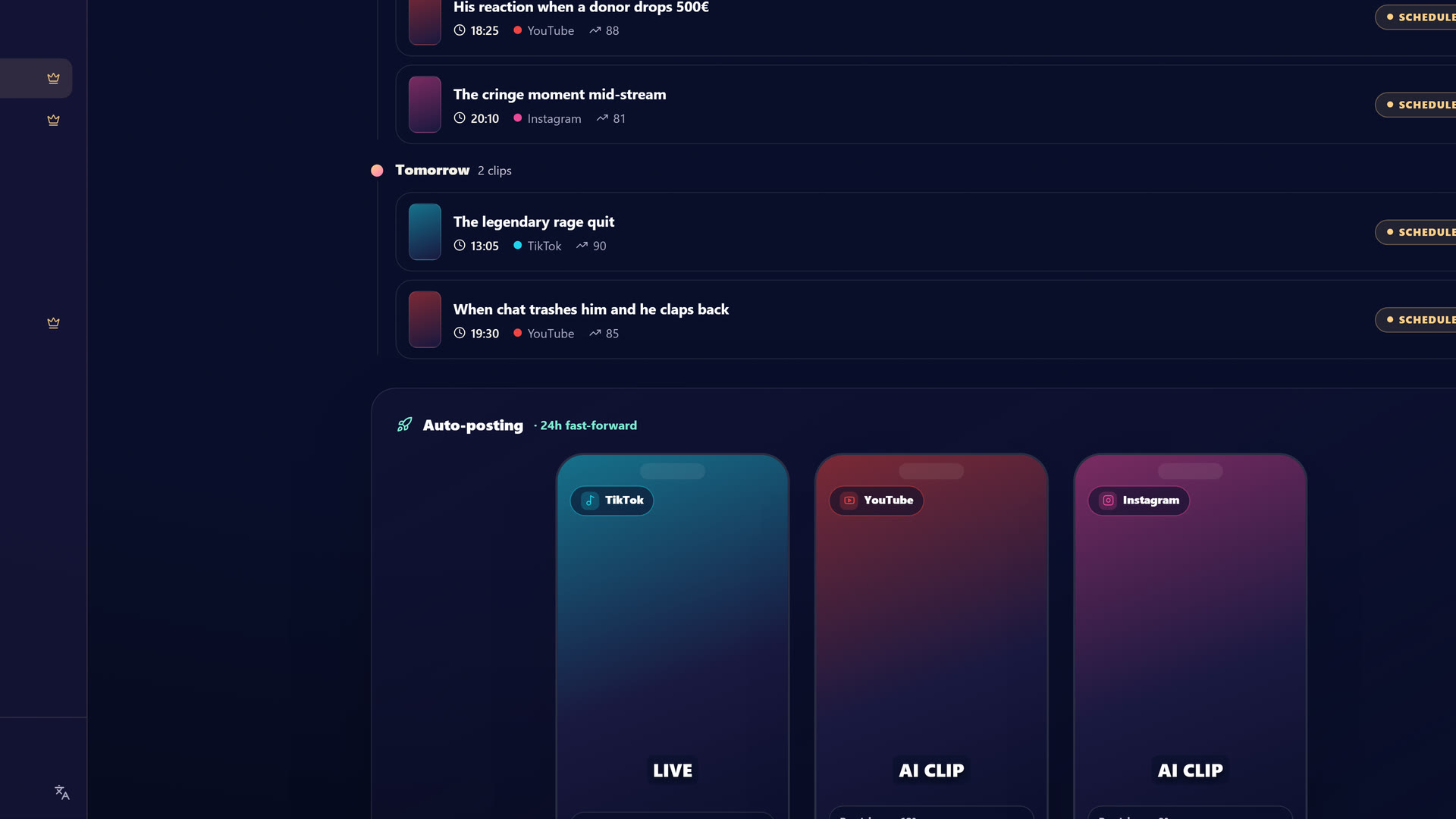 StreamClipping AutoPilot: clips get generated and scheduled across TikTok, Shorts and Reels so your week stays posted without daily manual work.
The principle : batch processing + automation
Before the calendar, understand why this works.
The beginner streamer does constant task switching : 30 min stream, 10 min Discord, 20 min editing a clip, 15 min Twitter, 1 hour stream again. Each switch costs 15-20 minutes of productivity (cognitive load). Over 50 switches per week, you lose 12-16 hours just in transitions.
The pro streamer does batch processing : groups similar tasks on dedicated slots. Single switch between categories per day, max.
And automates what can be (AI clipping via StreamClipping AI, social scheduling via Buffer, chat moderation via StreamElements AutoMod).
Result : 25 hours real work for the same output as a beginner doing 60 hours.
The optimal weekly calendar
Here's the typical week of a 1500-3000 viewer pro streamer in 2026.
Monday : Main stream + weekend recap
1pm-2pm     Wake, coffee, morning scroll (NON-WORK)
2pm-3pm     Stream prep (Twitter announce, check setup, game news lookup)
3pm-7pm     STREAM Twitch (4h, main format)
7pm-7:30pm  Post-stream cooldown (shower, walk, no screen)
7:30pm-8pm  Quick check Discord + critical DMs (max 30 min)
8pm-10pm    PERSONAL (dinner, series, sport)
Monday work total : 5h30. You produce 4h of stream = 25-30 clip potentials.
Tuesday : Secondary stream + initial post
2pm-3pm     Stream prep
3pm-7pm     STREAM Twitch (4h, can be different format : tournament, collab, IRL)
7pm-7:30pm  Cooldown
7:30pm-8:30pm Validate Monday's clips generated by StreamClipping AI (1h max)
8:30pm-10pm PERSONAL
Tuesday work total : 5h30. At this stage you have 50 clips in the machine, already validated.
Wednesday : YouTube long-form edit day
Most productive off-stream day. No live this day.
10am-12pm   Sport, walk, real lunch (DECOMPRESS)
12pm-2pm    Watch week clips, identify best-of for YouTube
2pm-6pm     EDIT YouTube long-form video (15-20 min final)
6pm-7pm     Thumbnail + title + SEO description
7pm-7:30pm  Schedule YouTube publish (Saturday typically)
7:30pm-10pm PERSONAL
Wednesday work total : 7h. But 0 stream = complete mental rest.
Thursday : Secondary stream + Discord premium
2pm-3pm     Prep
3pm-7pm     STREAM Twitch
7pm-7:30pm  Cooldown
7:30pm-8:30pm Discord premium : paid event or Q&A for $5/month tier
8:30pm-10pm PERSONAL
Thursday total : 6h30. Plus partially-monetized Discord premium.
Friday : Main stream + analytics
2pm-3pm     Prep
3pm-7pm     STREAM Twitch
7pm-7:30pm  Cooldown
7:30pm-8pm  Quick analytics (TwitchTracker, view count, top clips, etc.)
8pm-10pm    PERSONAL (outing, restaurant, social life)
Friday total : 5h30. Social life evening, important for long-term mental health.
Saturday : Fully off
ALL DAY OFF
Saturday total : 0h work. Real 1-day-per-week vacation, non-negotiable. See streamer burnout for why.
Sunday : Batch posts + week ahead
10am-1pm    PERSONAL (family lunch, sport, outing)
1pm-2pm     Schedule TikTok / Shorts / Reels posts for the week (Buffer)
2pm-3pm     Schedule Twitter / X for the week (5-7 takes)
3pm-4pm     Prep stream topics Monday-Friday
4pm-5pm     Reply to accumulated urgent DMs (1h max, skip the rest)
5pm+        PERSONAL
Sunday total : 4h work in morning. Rest is recovery.
Want these clips in your life?
StreamClipping turns your streams into vertical clips ready to post, animated captions included. Free plan for life, 15 minutes of video a month, no card.
Weekly total
| Day | Work hours | Main output |
|---|---|---|
| Monday | 5h30 | 1 stream + Monday clips |
| Tuesday | 5h30 | 1 stream + clip validation |
| Wednesday | 7h | 1 long-form YouTube video |
| Thursday | 6h30 | 1 stream + Discord premium |
| Friday | 5h30 | 1 stream + analytics |
| Saturday | 0h | Off |
| Sunday | 4h | Schedule next week |
| Total | 34h | 4 streams + 30 clips + 1 YT + 30 posts |
So 34 hours real work (not calendar bloat) producing :
- 4 Twitch streams (16h live)
- 30 multi-platform clips auto-generated and scheduled
- 1 long-form 15-20 min YouTube video
- 30+ posts split across 5 TikTok / Shorts / Reels accounts
- 5-7 tweets / takes
- 1 stream recap video (week best-of)
That's more production than 80% of streamers at 1500 viewers, in fewer hours than them.
What makes this calendar possible
1. Clipping is 100% automated
You no longer manually edit clips. StreamClipping AI generates the 30 clips while you sleep. You validate in 1h Tuesday evening, that's it.
Without automation : 30 clips × 30 min/clip = 15h editing per week. With automation : 1h validation. You save 14 weekly hours.
2. Post scheduling is batched
Sunday morning, you schedule via Buffer or StreamClipping AI native scheduling the entire week of posts. You don't touch TikTok / Shorts / Reels Monday to Saturday except for replying to top 5-10 most engaging comments per day.
Without batch : 30 min/day × 7 = 3h30 social management. With batch : 1h Sunday.
3. Wednesday is sacred for YouTube edit
You DON'T touch Twitch that day. No stream, no live management. All focus on 1 quality YouTube release per week. That video brings 30-50% of your new Twitch followers each week, passively.
4. Saturday off is non-negotiable
No "I'll just clip quickly", no "I'll just reply to 2 urgent DMs". Off = off. Otherwise your brain doesn't recover and your Monday will be mediocre.
1 email per week, zero bullshit.
2026 viral techniques, AI tools worth using, new TikTok formats that work. No spam, no aggressive pitch.
The "deload" calendar 1 week in 6
Every 6 weeks, do a deload week. Not fully off, but reduced load.
Stream count    : 2/week (instead of 4)
YouTube edit    : skip this week (auto best-of)
Discord premium : skip this week
TikTok posts    : half normal
Total work      : ~15h that week
Why : avoid chronic fatigue accumulation. Your viewers don't care, you just do 2 streams instead of 4 this week. You resume normal rhythm next week.
Over 1 year : 8 deload weeks + 44 normal weeks. You never burn.
Long vacations : 1 full week every 4 months
Scheduled 4 months in advance. Communicated to community 2 weeks before. During these vacations :
- 0 Twitch stream
- 0 new posted content
- 1 best-of YouTube video pre-scheduled to not disappear completely
- DMs in "I'm off until X, reply on return" mode
- Pro phone fully off
Cost : 0 income that week. Benefit : you keep streaming until 60-65 potentially, instead of breaking at 30.
How to transition from your current calendar to this one
If reading this thinking "impossible, I manage 70h/week now", here's the transition :
Week 1-2 : install AI clipping. Validate it works. Keep your old rhythm alongside.
Week 3-4 : start batching posts Sunday morning. Stop posting during the week.
Week 5-6 : move YouTube edit to Wednesday in block. No more between-stream tinkering.
Week 7-8 : install 1 day off (Saturday). Hard at first, fine in 2 weeks.
Week 9-10 : reduce streams from 5 to 4 per week. You'll be surprised : viewer count doesn't drop (often rises because you're fresher).
Week 11-12 : activate first deload week.
Total : 3 months to flip. Patience.
Common calendar mistakes
❌ Streaming 6 or 7 times per week. Above 5, you crack in 6 months. Always. The market doesn't reward quantity above a certain threshold.
❌ No off-stream Wednesday for YouTube edit. You'll write your edit in 30 min between 2 streams, garbage quality, abandon in 4 weeks.
❌ "I reply Discord live". You just killed your stream. Twitch viewer wants content, not 5 min of DM reading.
❌ Not pre-scheduling posts. You'll have to post during the week in "quick quick" mode, mediocre quality, not aligned with your editorial calendar.
❌ Skip 1 day off "because the week is heavy". That's exactly when you MUST take off. Otherwise you crack.
Conclusion : the calendar is your protection
The editorial calendar isn't a rigid thing killing your creativity. It's the opposite : it's the structure protecting your creativity against exhaustion.
Without calendar, you react day to day, burn in 24 months, and quit.
With this calendar, you produce more than 80% of competitors in fewer hours, keep a life outside streaming, can last 5 years, 10 years, more.
Simple choice. But not easy.
StreamClipping AI lets you try it free, 15 minutes of video per month for life, no credit card.
Keep reading :
- Streamer burnout : signals at 3, 12, 36 months the why behind this calendar
- How to turn 1 Twitch stream into 30 viral clips the lever making this calendar possible
- From 0 to 1000 Twitch viewers in 6 months the strategy plugging into this calendar
- 15 AI tools for streamers 2026 the stack automating your repetitive tasks
- Optimal OBS setup for streaming in 2026
Ready to turn your streams into scroll-stopping clips without burning your nights? Try StreamClipping free: 15 minutes of video a month for life, no card.
Built with love, by a streamer for streamers. Ragnarlebroc.